Point. See. Fix.
Ermes recognises the object in front of you and puts the one thing you need to know right on it — at the moment you need it. No manual, no folder, no search. And when a colleague joins by video, the guidance stays live on the equipment while you keep both hands in the work.
Recognise
The camera stream is matched against your equipment models — down to variant, revision and orientation.
Understand
Ermes reads the current state: which panel is open, which bolt is missing, which step you're on.
Instruct
The next action is anchored in AR onto the real object: what to touch, which way to turn, to what value.
Confirm
Each step is visually verified and logged — photo, timestamp, outcome — before the next one unlocks.
The instruction lands on the part, not in a document.
Nobody reads the manual at the top of a ladder.
The knowledge usually exists — buried in a 400-page PDF, a training video nobody remembers, a forum thread, or someone's head. Ermes collapses that search to zero: it already knows which machine you're looking at, which variant, which step you're on, and shows only that.
One instruction at a time, on the object, in context. Nothing to scroll past, nothing to translate from a diagram into the thing in front of you.
No documents to open
Manuals, SOPs and service bulletins stay in the background as source material — never as reading.
No searching
No keywords, no part numbers, no wrong revision. The camera is the query.
Only what's relevant now
Step four of twelve, on this variant, in this state. Not the whole procedure at once.
Zero context switching
Eyes stay on the equipment. Hands stay on the tools. Attention stays on the job.
Call a colleague without ever leaving the machine.
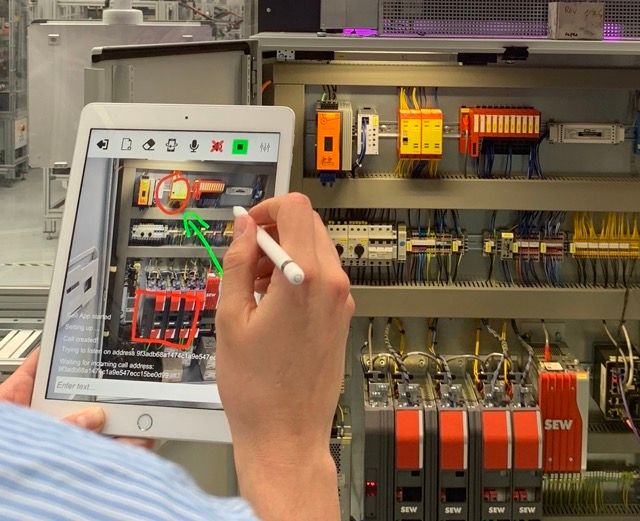
On a normal video call, the moment you connect you stop working: the phone becomes a window, one hand is gone, and the other person is describing things you can't see. In Ermes the call runs inside the AR session. The expert sees exactly what you see, draws directly onto the real equipment, and the AI keeps guiding underneath the whole time.
The environment stays live
AR anchors, step tracking and overlays keep running during the call. The call is a layer on the work, not a replacement for it.
The expert draws on reality
Arrows, circles and notes stick to the physical object — not to a frozen screenshot. Move around; the mark stays on the bolt.
AI and human, together
Ermes keeps checking steps and confidence while the human handles the judgment call. Neither one waits for the other.
Hands stay free
Voice control and head-mounted display support mean you can hold a tool and a conversation at the same time.
Survives bad links
Low-bandwidth mode degrades to still frames and voice, then resyncs — guidance never stops on site.
The call becomes knowledge
Annotated moments and the resolution are captured, so the next person doesn't need the same call.
Most escalations never need a call. When one does, it takes minutes instead of a site visit — and the operator keeps working through all of it.
Everything an operator needs, and nothing they have to read.
Expert on demand, not on standby
Most jobs are self-served on first contact. When one isn't, a human joins the same AR session in seconds.
Smartphone-first
Runs on standard iOS and Android through ARKit and ARCore. Smart glasses supported where hands must stay free.
Works offline
Procedures and models cache on device. Basements, hulls, rigs and remote sites keep working without signal.
Authoring without code
Turn an existing PDF, video or walkthrough into a guided procedure with your own technicians.
Learns continuously
Every completed procedure feeds recognition and step timing. Next quarter ships sharper than today.
Audit trail by default
Who did what, when, on which asset — exportable to your CMMS, MES or QA system.
- Devices
- iOS 15+ and Android 10+ phones and tablets; optional head-mounted displays for hands-free work.
- Recognition input
- CAD, photogrammetry scans, or a supervised capture session on the real asset.
- Connectivity
- Online, intermittent or fully offline with deferred sync.
- Integrations
- CMMS and EAM (SAP PM, Maximo), MES, ticketing, SSO via SAML or OIDC.
- Deployment
- Cloud, private cloud, or on-premise for restricted sites.
- Time to first procedure
- Two to four weeks from asset capture to operators using it on the floor.
Machine maintenance and assembly on the factory floor · field operations in oil, gas and construction · equipment setup on production and event sites · any procedure where the person holding the phone isn't the person who knows the answer.
Do we need CAD models of everything?
No. CAD makes onboarding fastest, but we can build recognition from a guided capture session on the physical asset when drawings don't exist or are out of date.
What happens when the AI isn't sure?
Ermes shows its confidence and falls back to the safest path — a wider instruction, a request to reframe, or an escalation to a human reviewer. It never bluffs a step.
Can our own people author procedures?
Yes. Authoring is designed for maintenance leads and trainers, not developers. Most customers are self-sufficient after the first two procedures.
Is the video call just a normal video call?
No. It runs inside the AR session: the remote expert annotates the physical object, the annotations stay anchored as the operator moves, and AI guidance keeps running underneath. The operator never stops working to take the call.
How does this differ from Iris?
Ermes guides someone doing work. Iris supervises someone inspecting work and produces the report. Many customers run both.
Three seconds. No expert required.
Bring us one procedure that costs you time today. We'll show it running on your own equipment.
Book Your Demo →